What is the best flashcard app in 2026? After testing dozens of tools across medical school, language learning, and professional certification prep, the honest answer is: it depends on how you study and where. But there are clear winners for each use case, and a few apps that have quietly become the gold standard for specific workflows. In this guide we break down the seven best flash card apps available today — their real strengths, their real limitations, and exactly who each one is built for.
Flashcards work. Not because they are nostalgic or simple, but because they are one of the few study tools built around how memory actually functions. The best flashcard app is not the one with the prettiest interface — it is the one that maximizes active recall and keeps you reviewing at the right intervals. Everything else is secondary.
Why Flashcards Work: The Science Behind Active Recall and Spaced Repetition
The effectiveness of flashcards is not folklore. It is one of the most replicated findings in cognitive psychology. Two mechanisms drive the results: active recall and spaced repetition.
Active recall is the act of retrieving information from memory rather than passively re-reading it. When you look at a flashcard question and force yourself to produce the answer before flipping the card, you are triggering a retrieval attempt. This process, sometimes called the testing effect, physically strengthens the neural pathways associated with that memory. Research published in Psychological Science in the Public Interest found that practice testing produced a 50–100% improvement in retention compared with re-reading the same material. Highlighting, rereading, and summarizing — common alternatives — produced no comparable benefit.
Spaced repetition determines when those retrieval attempts happen. Instead of reviewing all cards every day, a spaced repetition algorithm schedules each card individually based on how well you recalled it. A card you struggled with comes back tomorrow. A card you nailed gets pushed out two weeks. This exploits what psychologists call the spacing effect — the empirically confirmed finding that distributing practice over time produces far better long-term retention than massed practice (cramming).
The practical implication: 15 minutes of spaced flashcard review per day consistently outperforms a three-hour study session the night before an exam. This is not an opinion. It is one of the most replicated results in learning science. The best digital flashcard apps automate this scheduling so you never have to decide which cards to review — the algorithm handles it.
The 7 Best Flashcard Apps in 2026
Each app below was evaluated on four dimensions: quality of spaced repetition, ease of card creation, platform availability, and price. There is no single best flash card app for everyone, but each one on this list excels in at least one dimension that makes it the right choice for a specific type of learner.
1. Anki — The Gold Standard for Serious Learners
Anki has been the go-to tool for medical students, language learners, and anyone pursuing deep long-term retention since 2006. It remains the most powerful free flashcard application available and the benchmark against which every other app is measured.
Anki uses the SM-2 spaced repetition algorithm (an evolution of the original SuperMemo algorithm developed by Piotr Wozniak in the 1980s), which remains among the most battle-tested scheduling systems in existence. Decks can contain images, audio, LaTeX equations, and video. The AnkiWeb shared deck library hosts over 10,000 community-created decks covering medical licensing exams (USMLE Step 1, USMLE Step 2), language vocabulary sets, bar exam prep, and hundreds of other subjects.
Pros: Free on desktop (Windows, Mac, Linux) and Android. Powerful, configurable spaced repetition. Enormous shared deck library. Supports rich media including audio flashcards with audio playback. Plugin ecosystem for advanced users. Data stored locally by default. AnkiWeb sync available for cross-device use.
Cons: The iOS app (AnkiMobile) costs $24.99 — a one-time fee that funds ongoing development. The desktop interface has not been modernized and can feel intimidating to new users. Card creation requires learning a template system. Setting up a well-structured deck from scratch takes meaningful effort. For a detailed walkthrough, see our Anki on iPad setup guide.
Price: Free (desktop + Android). $24.99 one-time for iOS.
Best for: Medical students, serious language learners, anyone committed
to long-term mastery.
2. Quizlet — Easiest to Start, Most Restrictive at Scale
Quizlet has over 60 million monthly active users, making it by far the most-used flashcard platform in the world. Its clean, polished interface and multiple study modes (Learn, Test, Match, Gravity) make it uniquely approachable for students who have never used spaced repetition before.
The platform shines for short-term test prep and collaborative studying. Teachers create class sets and students join them directly. AI-powered features generate practice tests from your sets automatically. The shared content library is massive.
Pros: Beautiful interface. Easy manual card creation. Large library of public study sets. Multiple study modes. Works on all major platforms. Good for social and classroom learning.
Cons: The free tier has been significantly restricted since 2022. Many features that were once free (ad-free studying, offline access, advanced learning modes) now require Quizlet Plus at $35.99/year. The spaced repetition implementation is less sophisticated than Anki's. Content is stored on Quizlet's servers. Ads in the free tier can interrupt study sessions.
Price: Free (limited). Quizlet Plus: $35.99/year.
Best for: Students with existing Quizlet sets, classroom environments,
short-term exam prep.
3. Flashcard Maker (Chrome Extension) — Best for Web-Based Learners
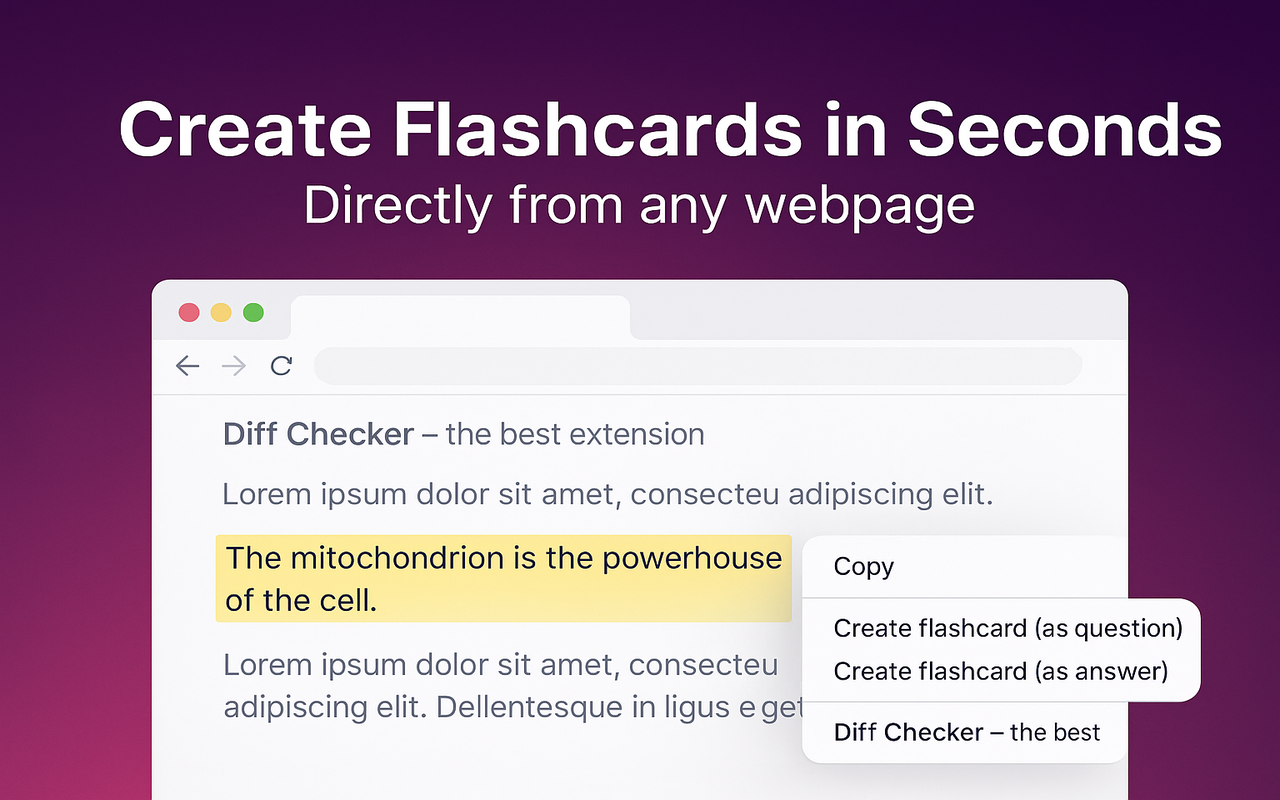
Flashcard Maker takes a fundamentally different approach to the card creation problem. Every other app on this list requires you to stop reading, open a separate application, and manually type out your flashcards. Flashcard Maker eliminates that friction entirely: highlight any text on any webpage, right-click, and the flashcard is created in under two seconds without leaving the page.
For anyone who does a significant portion of their learning through web browsers — reading documentation, research papers, news articles, online textbooks — this workflow change is meaningful. The act of creating cards no longer competes with the act of reading. You capture knowledge as you encounter it.
The extension includes a built-in spaced repetition review system, deck organization, and export to Anki (APKG), Quizlet (TSV), CSV, and printable PDF. All data is stored locally in the browser; nothing is sent to any server, which makes it suitable for studying sensitive professional or medical material. The best notecard app for browser-based workflows is one that lives inside the browser itself.
Pros: Create flashcards from any webpage in seconds with no context switch. Completely free, no subscription, no account required. Full privacy — data stays in your browser. Built-in spaced repetition. Export to Anki, Quizlet, CSV, PDF. Works offline. Lightweight (under 1MB). Supports the audio flashcards app workflow by letting you save audio-rich web content.
Cons: Chrome-only (Firefox and Safari support are on the roadmap). Not a standalone mobile app — requires a desktop or laptop browser. Card creation from scratch (without web content) is possible but not the primary use case.
Price: Free.
Best for: Developers, researchers, students who read extensively online,
anyone who wants frictionless capture without leaving their browser.
4. Brainscape — Confidence-Based Repetition with Polished Content
Brainscape uses a confidence-based repetition (CBR) system where after each card you rate your confidence on a 1–5 scale rather than a binary correct/incorrect judgment. The algorithm then prioritizes lower-confidence cards more aggressively. The result is a study session that feels genuinely adaptive.
The platform is particularly strong for its professionally curated content library. Brainscape employs subject matter experts to produce certified flashcard sets for GRE, SAT, LSAT, CPA, CFA, and foreign language certification exams. These sets are more carefully constructed than most user-generated alternatives.
Pros: Intuitive confidence rating system. High-quality certified content decks. Clean, modern interface. Good mobile apps on iOS and Android.
Cons: Premium content requires a paid subscription. Free tier is limited to basic features. Creating custom decks works but feels secondary to the curated content model. Not as configurable as Anki.
Price: Free (limited). Pro: $9.99/month or $59.99/year.
Best for: Professional certification prep, learners who prefer curated
content over DIY card creation.
5. RemNote — Notes and Flashcards in One System
RemNote is the most unusual app on this list because it does not primarily think of itself
as a flashcard app. It is a note-taking tool that automatically generates flashcards from
your notes using a double-colon syntax (Term :: Definition). The appeal is
that you never have to maintain two separate systems: your notes and your flashcards are
the same document.
This approach works exceptionally well for learners who already take detailed notes and want those notes to become reviewable without extra effort. The spaced repetition system is solid and the interface, while complex, is highly capable.
Pros: Notes and flashcards are unified. Automatic card generation from note syntax. Powerful knowledge graph and document linking. Good spaced repetition. Available on web, desktop, and mobile.
Cons: Steep learning curve. More complex than most learners need. Free tier has limitations. The hybrid approach means it is not as streamlined as a dedicated flashcard app for pure review workflows.
Price: Free (limited). Pro: $8/month.
Best for: Note-takers who want flashcard review without a separate app,
knowledge workers building a personal knowledge base.
6. Gizmo — AI-Powered Card Generation
Gizmo is one of a new wave of AI-native flashcard apps that entered the market in 2023–2024. Its core feature is automatic flashcard generation from uploaded PDFs, documents, and web content using large language models. Upload a chapter from your textbook and Gizmo generates a complete deck in under a minute.
The quality of AI-generated cards varies, but Gizmo's output is generally better than most competitors in this category. The review interface is clean and mobile-friendly. For learners who struggle with the card creation step, the AI generation feature meaningfully lowers the barrier to getting started.
Pros: AI-generated cards from uploaded content. Clean interface. Good mobile experience. Removes the card creation bottleneck entirely for document-based study.
Cons: Relatively new, so the shared deck library is smaller than Anki or Quizlet. AI-generated cards sometimes require editing for accuracy. Pricing is still evolving. Less configurable spaced repetition than Anki.
Price: Free tier available. Pro plans vary.
Best for: Students who want AI to handle card creation from textbooks
and PDFs.
7. AnkiDroid — Best Free Android Flashcard App
AnkiDroid is the free, open-source Android companion to Anki desktop. While it is technically a separate project maintained by a different team of volunteers, it syncs seamlessly with AnkiWeb and is fully compatible with all Anki decks. For Android users who want the full power of Anki's spaced repetition system without paying for a mobile app, AnkiDroid is the answer.
The interface is more modern than Anki desktop and feels natural on mobile. You can create cards, review scheduled decks, and sync with AnkiWeb all from your phone. It supports the full range of Anki card types including audio, images, and cloze deletions.
Pros: Completely free on Android. Full Anki compatibility. Syncs with AnkiWeb. Supports all card types including audio. Active development community.
Cons: Android only. Interface, while better than desktop Anki, is still less polished than Quizlet or Brainscape. Best used in conjunction with Anki desktop rather than as a standalone tool.
Price: Free.
Best for: Android users who want full Anki power on mobile at no cost.
Flashcard App Comparison: All 7 Apps at a Glance
| App | Price | Spaced Repetition | Platform | Best For |
|---|---|---|---|---|
| Anki | Free (iOS $24.99) | SM-2 (excellent) | Win / Mac / Linux / Android / iOS | Long-term mastery, medical, languages |
| Quizlet | Free / $2.99/mo | Limited (paid only) | Web / iOS / Android | Short-term exam prep, classrooms |
| Flashcard Maker | Free | FSRS-5 (excellent) | Chrome (desktop) | Web readers, researchers, developers |
| Brainscape | Free / $7.99/mo | CBR (confidence-based) | Web / iOS / Android | Professional certifications |
| RemNote | Free / $8/mo | Good | Web / Desktop / Mobile | Note-takers, knowledge workers |
| Gizmo | Free / varies | Good | Web / Mobile | AI-generated cards from documents |
| AnkiDroid | Free | SM-2 (excellent) | Android only | Android users wanting free Anki |
Best Free Flashcard Apps Worth Trying in 2026
If budget is a constraint, the best free flashcard app options are genuinely excellent — you do not need to pay for a good spaced repetition experience.
Anki (desktop + Android) remains the single best free flashcard application available. It is more powerful than most paid alternatives. The only caveat is the learning curve: plan to spend an hour learning the basics before your first real study session.
Flashcard Maker is the best free option for anyone who primarily learns through web browsing. Zero cost, zero account, full spaced repetition, and the fastest card creation workflow of any app on this list. For students reading research papers or documentation online, it is hard to beat.
AnkiDroid is the best free Android flashcard app, period. It gives you the full Anki experience on mobile without the iOS price tag.
Quizlet's free tier is viable if you are studying from existing shared sets and do not need offline access or advanced learning modes. The restrictions have made it less compelling than it was in 2020, but for short-term test prep with existing content it still works.
Flashcards for Language Learning
Language learning is where flashcard apps have their longest track record and most dedicated user communities. Vocabulary acquisition is fundamentally a memorization task, and spaced repetition is provably the most efficient approach to it. The question is which app handles the specific requirements of language learning best.
For flashcards for language learning, audio support is non-negotiable. You need to hear words pronounced correctly, not just see them spelled. Anki handles this exceptionally well — shared language decks on AnkiWeb typically include native speaker audio for every card, and there are comprehensive pre-made decks for Spanish, Japanese, Mandarin, French, German, Portuguese, Korean, and dozens of other languages. The most popular language learning decks use the Refold methodology, which prioritizes high-frequency vocabulary in context sentences rather than isolated word-translation pairs.
For Spanish specifically, the Spanish flashcards app ecosystem is particularly well developed on Anki. Decks like "Ultimate Spanish Vocabulary" (30,000+ words with audio) and various frequency-list-based decks are available free on AnkiWeb. These are more comprehensive and better sequenced than most paid alternatives.
Brainscape has professionally curated Spanish and French language decks that are well constructed for beginners. Quizlet has enormous amounts of community-created language content but quality varies significantly between sets. For serious language learners pursuing fluency rather than just passing a test, Anki with a high-quality shared deck is the most effective option available.
Flashcard Maker is useful during the immersion phase of language learning — when you are reading articles and news in your target language online and want to capture unfamiliar vocabulary instantly without breaking your reading flow. Select the word, right-click, create the card. Export to Anki later.
How to Choose the Right Flashcard App
The right app is the one that removes friction from your specific workflow. Here is a straightforward decision framework:
Use Anki if you are pursuing long-term mastery of a subject that requires thousands of facts — medical licensing, language fluency, bar exam, professional certifications. The upfront learning investment pays compounding dividends.
Use Flashcard Maker if you read extensively online and want to capture knowledge as you encounter it without changing your workflow. It is the best notecard app for browser-native study sessions.
Use Quizlet if you are studying for a near-term exam using existing shared sets, or if you are in a classroom environment where the teacher uses Quizlet.
Use Brainscape if you are preparing for a professional certification and want high-quality pre-made content with a polished mobile experience.
Use RemNote if you already take extensive notes and do not want to maintain a separate flashcard system. The note-to-flashcard pipeline is genuinely elegant once you learn the syntax.
Consider your privacy requirements. If you are studying medical cases, legal documents, or proprietary information, choose a tool that stores data locally. Flashcard Maker keeps everything in your browser. Anki stores data locally by default. Cloud-based services like Quizlet and Brainscape store your content on their servers. And if your primary goal is building math fact fluency, our dedicated math flash cards guide covers the best tools and techniques for arithmetic mastery.
Tips for Effective Flashcard Studying
The right app accounts for maybe 20% of your results. The other 80% comes from how you use it. These principles apply regardless of which tool you choose.
Keep cards atomic. Each card should test exactly one concept. A card asking "What is photosynthesis?" is better than "Explain photosynthesis including all reactants, products, and stages." Atomic cards are faster to review and let you pinpoint exactly what you do and do not know. When you fail a large card, you cannot tell which part of it you forgot.
Use your own words. Resist copy-pasting definitions verbatim. Rewriting information in your own words forces processing that is itself a form of active recall. When using Flashcard Maker to create cards from web content, take 10 seconds to rephrase the selected text before saving. That 10 seconds produces measurably better retention.
Add context and examples. "Mitochondria — powerhouse of the cell" is less useful than "Mitochondria — organelle that generates ATP through oxidative phosphorylation; has its own DNA; originated via endosymbiosis." The additional context creates more retrieval cues and more pathways to the correct answer.
Study consistently, not intensively. Twenty minutes of flashcard review every day produces far better results than a three-hour session once a week. This is the spacing effect made practical. Set a daily review habit. If you cannot do 20 minutes, do five. Consistency beats intensity in every study regime.
Trust the algorithm. If you use an app with spaced repetition, do not manually review cards that are not scheduled. The algorithm knows when retrieval will be difficult enough to strengthen memory. Reviewing too early makes retrieval too easy and reduces the strengthening effect. This is counterintuitive but well-supported.
Delete ruthlessly. Not every piece of information deserves a flashcard. If a card is too vague, too broad, or covers something you will never use, delete it. A lean, focused deck of 200 well-crafted cards outperforms a bloated deck of 2,000 mediocre ones. Review sessions should feel purposeful, not like a chore.
Getting Started with Flashcard Maker
If you spend meaningful time reading articles, research papers, documentation, or online textbooks, Flashcard Maker can transform that passive reading into active learning without any workflow change.
Install the extension from the Chrome Web Store. It takes under 10 seconds and requires no account or sign-up. Once installed, navigate to any webpage. Highlight text you want to learn, right-click, and choose "Create Flashcard" from the context menu. Assign it to a deck, add a note if you want, and continue reading. The card is saved.
When you are ready to review, open the extension popup and start a spaced repetition session. Cards due for review are presented one at a time. Mark each as correct or incorrect and the algorithm schedules your next review automatically.
When you have built a meaningful deck, export it to Anki, Quizlet, CSV, or printable PDF. You are never locked into a single platform. Your data stays in your browser, fully under your control.
Ready to study smarter?
Join 216+ students and professionals turning any webpage into study material — for free.
Install Flashcard Maker — It's Free