Quizlet was the default flashcard app for millions of students for over a decade. Then the free tier got gutted. Ads showed up mid-session. The features that made it worth using — offline access, advanced learning modes, ad-free studying — moved behind a paywall. Search traffic for “quizlet alternatives” has more than doubled since 2022. This guide exists because that search deserves a real answer.
Below are the ten best apps and websites like Quizlet available in 2026, evaluated honestly across price, spaced repetition quality, platform availability, and the specific use cases each one handles best. Whether you want a completely free version of Quizlet or a paid upgrade that genuinely justifies the cost, there is a better option on this list for you. For a broader look at study tools beyond Quizlet’s category, see our best flashcard app guide.
Why Look for Quizlet Alternatives?
Quizlet’s free tier restrictions have expanded significantly since 2022. The following features now require Quizlet Plus ($35.99/year or $7.99/month):
- Ad-free studying
- Offline access to study sets
- Advanced study modes including Learn with full scheduling
- Unlimited image uploads
- Scanning documents to create sets
The free tier still lets you create and flip through sets manually, access publicly shared sets, and use the basic Flashcards and Match modes. For students who only need short-term test prep from existing content, it remains functional. For anyone who wants genuine spaced repetition, offline study, or an ad-free experience, the free tier no longer delivers what it once did.
Beyond pricing, Quizlet has structural limitations that no paid tier resolves. Its spaced repetition implementation is less sophisticated than Anki’s SM-2 algorithm. All data lives on Quizlet’s servers, which creates privacy concerns for anyone studying sensitive professional, medical, or legal material. And the platform is entirely web/app-based, meaning there is no way to create cards directly from the web pages you are reading.
The 10 Best Quizlet Alternatives in 2026
These apps and sites like Quizlet cover every study style and budget. Each has been assessed on the four dimensions that matter most: spaced repetition quality, ease of card creation, platform availability, and value for money.
1. Flashcard Maker (Chrome Extension) — Best Free Alternative for Web Learners
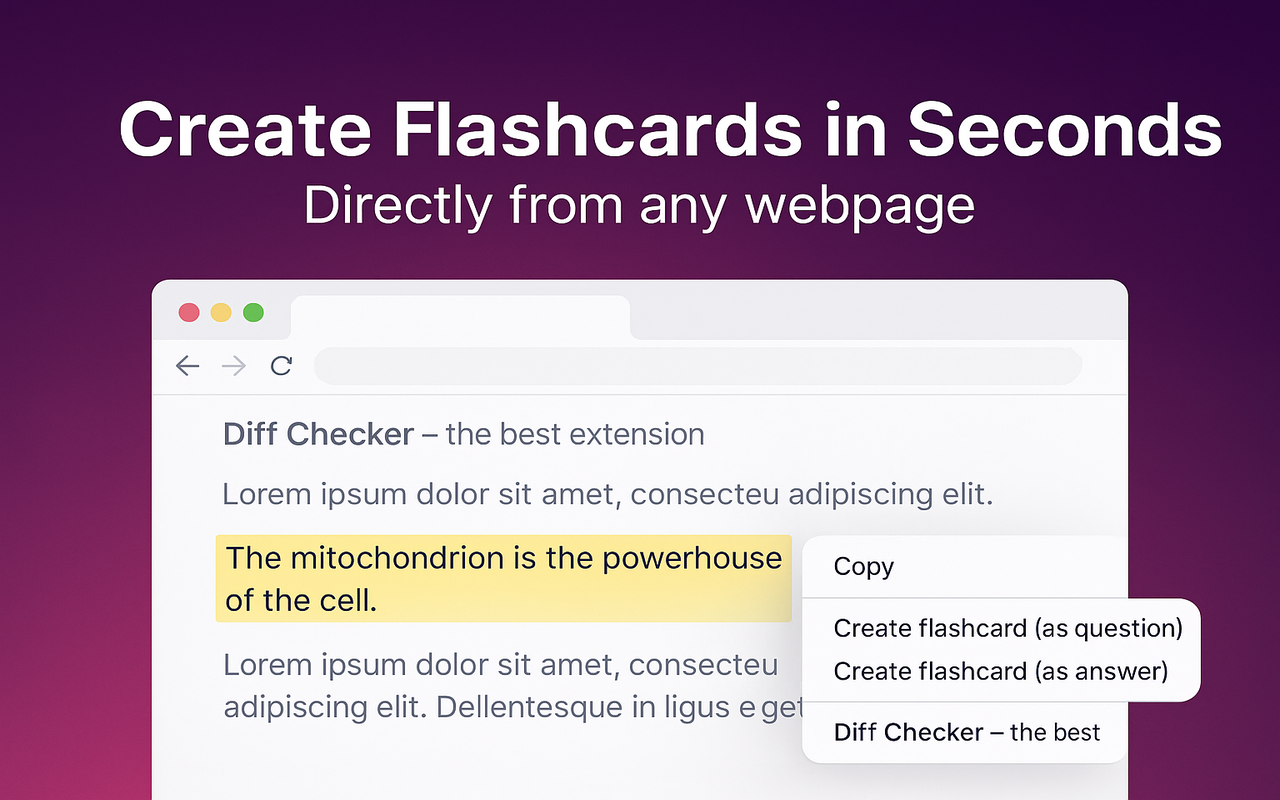
Flashcard Maker is the most direct free version of Quizlet for anyone who does their learning through a web browser. It is a Chrome extension that lets you highlight any text on any webpage, right-click, and create a flashcard in under two seconds — without leaving the page, without an account, and without a subscription.
The extension includes a built-in spaced repetition review system using the FSRS-5 algorithm, which is more accurate than Quizlet’s scheduling. Decks are organized locally inside your browser; nothing is sent to any server. This matters for students studying medical cases, legal documents, or proprietary professional material.
Export options cover Anki (APKG), Quizlet-compatible TSV, CSV, and printable PDF. You are never locked in. If you eventually migrate to Anki for long-term mastery, your Flashcard Maker decks import directly. The extension is under 1MB and works entirely offline after installation.
Pros: Completely free, no account required. Fastest card creation workflow of any app on this list. Full spaced repetition with FSRS-5. Privacy-first (data stays in your browser). Export to Anki, Quizlet, CSV, PDF. Works offline.
Cons: Chrome-only (Firefox and Safari support planned). Not a standalone mobile app. Requires a desktop or laptop to create cards from web pages.
Price: Free.
Best for: Students, researchers, and developers who read extensively
online and want frictionless card capture without leaving their browser.
2. Anki — Most Powerful Free Quizlet Alternative
Anki is the gold standard for serious learners and the single most powerful free flashcard application available. Medical students, language learners, and bar exam candidates have used it for years because its SM-2 spaced repetition algorithm outperforms every competitor in scheduling accuracy.
The shared deck library on AnkiWeb hosts over 10,000 community-created decks covering USMLE Step 1 and Step 2, language vocabulary sets, bar exam content, and hundreds of other subjects. Cards can contain images, audio, LaTeX equations, and video. A plugin ecosystem extends functionality for advanced users.
Pros: Free on desktop (Windows, Mac, Linux) and Android. Best-in-class spaced repetition. Enormous shared deck library. Supports audio, images, LaTeX. Full data ownership (stored locally). No ads.
Cons: iOS app (AnkiMobile) costs $24.99 one-time. Steep learning curve for new users. Interface is functional but dated. Card creation from scratch requires learning a template system.
Price: Free (desktop + Android). $24.99 one-time for iOS.
Best for: Medical students, serious language learners, anyone pursuing
deep long-term mastery.
3. Brainscape — Best Confidence-Based Repetition
Brainscape uses confidence-based repetition (CBR): after each card, you rate your confidence on a 1–5 scale rather than a binary correct/incorrect judgment. The algorithm prioritizes lower-confidence cards more aggressively. The result feels more adaptive than Quizlet’s learn mode in practice.
The platform’s strongest feature is its professionally curated content library. Brainscape employs subject matter experts to produce certified flashcard sets for GRE, SAT, LSAT, CPA, CFA, and foreign language certifications. These decks are more carefully constructed than most user-generated content on Quizlet.
Pros: Intuitive confidence rating system. High-quality certified decks for major exams. Clean, modern interface. Good iOS and Android apps.
Cons: Premium certified content requires a paid subscription. Free tier is limited to basic features and user-created decks. Less configurable than Anki.
Price: Free (limited). Pro: $9.99/month or $59.99/year.
Best for: Professional certification prep (GRE, LSAT, CPA, CFA),
learners who prefer curated content over building their own decks.
4. RemNote — Best for Note-Takers Who Want Flashcards Built In
RemNote is a note-taking tool that automatically generates flashcards from your notes
using a double-colon syntax (Term :: Definition). You never maintain two
separate systems: your notes and your flashcards are the same document. This is the
most elegant solution for learners who already take detailed notes.
The spaced repetition system is solid and the interface, while more complex than Quizlet, is highly capable. RemNote supports knowledge graphs, document linking, and hierarchical note organization alongside the flashcard review workflow.
Pros: Notes and flashcards unified in one system. Automatic card generation from note syntax. Powerful knowledge graph. Good spaced repetition. Web, desktop, and mobile apps available.
Cons: Steep learning curve. More complexity than most learners need. Free tier has limitations. Not as streamlined as a dedicated flashcard app for pure review sessions.
Price: Free (limited). Pro: $8/month.
Best for: Knowledge workers and students who take extensive notes and
want flashcard review without running a separate app.
5. Gizmo — Best AI-Powered Card Generation
Gizmo generates flashcard decks automatically from uploaded PDFs, documents, and web content using large language models. Upload a textbook chapter and Gizmo produces a complete deck in under a minute. For learners who struggle with the card creation step, this is the most direct solution available.
The quality of AI-generated cards varies, but Gizmo’s output is generally accurate for factual subjects. The review interface is clean and mobile-friendly. It is one of the newer study apps like Quizlet, so its shared deck library is still smaller than Anki or Quizlet, but its core AI generation feature covers that gap.
Pros: AI-generated cards from uploaded content. Clean interface. Good mobile experience. Removes the card creation bottleneck for document-based study.
Cons: Newer platform with a smaller community library. AI-generated cards sometimes require editing for accuracy. Pricing is still evolving. Less configurable spaced repetition than Anki.
Price: Free tier available. Pro plans vary.
Best for: Students who want AI to handle card creation from textbooks,
PDFs, and lecture notes.
6. AnkiDroid — Best Free Android Flashcard App
AnkiDroid is the free, open-source Android companion to Anki desktop. It syncs seamlessly with AnkiWeb and is fully compatible with all Anki decks. For Android users who want the full power of Anki’s spaced repetition without paying for a mobile app, AnkiDroid is the definitive answer.
The interface is more modern than Anki desktop and natural on mobile. It supports all Anki card types including audio, images, and cloze deletions. Used in combination with Anki desktop or Flashcard Maker for card creation, AnkiDroid covers the mobile review side of the workflow at zero cost.
Pros: Completely free on Android. Full Anki compatibility. Syncs with AnkiWeb. Supports all card types. Active volunteer development community.
Cons: Android only. Best used alongside Anki desktop rather than as a standalone card creation tool.
Price: Free.
Best for: Android users who want full Anki capability on mobile at
no cost.
7. Cram — Simplest Free Option
Cram is one of the oldest flashcard websites, predating Quizlet’s rise to dominance. Its interface is basic and the design is dated, but the core functionality works: create sets, flip through cards, and access a large library of user-created content. The free tier is substantially more permissive than Quizlet’s current free offering.
Cram does not have meaningful spaced repetition, but it supports study modes including multiple choice, true/false, and matching games. For students who want the simplest possible flashcard experience without a subscription, Cram remains a viable option.
Pros: Generous free tier. Large existing content library. Multiple study modes. No subscription required for basic use.
Cons: Dated interface. No meaningful spaced repetition. Mobile apps are less polished than competitors.
Price: Free (with ads). Cram Pro: $4.99/month.
Best for: Students who want the simplest free flashcard experience
without committing to a more complex tool.
8. StudyBlue — Social Learning Focus
StudyBlue differentiates itself through social and collaborative learning features. Students can share study sets, find decks created by classmates, and track their progress against class averages. It has been particularly popular at the college level for courses where multiple students are studying the same material.
The platform was acquired and integrated into Chegg, which adds access to Chegg’s broader academic content library for subscribers. The social layer is its primary advantage over other Quizlet alternatives; the spaced repetition implementation is basic.
Pros: Social and collaborative study features. Large library of course-specific student-created content. Integration with Chegg content for subscribers.
Cons: Spaced repetition is limited. Free tier significantly restricted after Chegg acquisition. Best used when classmates are already on the platform.
Price: Limited free tier. Chegg subscription: $14.95/month.
Best for: College students whose classmates are already sharing study
sets on the platform.
9. Knowt — AI Quiz Maker from Notes
Knowt positions itself directly as a Quizlet alternative with a more capable free tier. It uses AI to convert notes, PDFs, and documents into flashcards and practice quizzes automatically. The quiz generation is Knowt’s strongest feature: it produces multiple-choice, fill-in-the-blank, and true/false questions from your source material without manual effort.
The free tier is genuinely more permissive than Quizlet’s current offering, with no ads and access to AI quiz generation within monthly limits. It targets high school and early college students with a polished, modern interface.
Pros: Generous free tier. AI quiz generation from uploaded notes and PDFs. Multiple quiz formats. Clean, modern interface. Ad-free free tier.
Cons: Spaced repetition less sophisticated than Anki. AI-generated questions occasionally require editing. Monthly limits on AI features in free tier.
Price: Free (with limits). Pro: $4/month.
Best for: High school and college students who want AI-generated
quizzes from their notes without Quizlet’s paywall.
10. Flashcard Lab — Vocabulary-Focused
Flashcard Lab is a straightforward vocabulary-focused flashcard tool with a clean interface and no subscription requirement. It is not trying to compete with Anki on algorithm depth or Gizmo on AI features. It does one thing: lets you create, organize, and review vocabulary flashcard sets quickly and without friction.
For language learners building targeted vocabulary sets, or students memorizing subject-specific terminology, the simplicity is an asset rather than a limitation. No account is required to create and review sets.
Pros: Simple, fast, no account required. Good for focused vocabulary study. Clean interface with no clutter. Free.
Cons: Limited features beyond basic flashcard review. No spaced repetition algorithm. No collaborative or social features. Small community library.
Price: Free.
Best for: Language learners and students who want the simplest
possible vocabulary flashcard tool.
Quizlet Alternatives Comparison Table
| App | Price | Spaced Repetition | Platform | Best For |
|---|---|---|---|---|
| Flashcard Maker | Free | FSRS-5 (excellent) | Chrome (desktop) | Web readers, researchers, developers |
| Anki | Free (iOS $24.99) | SM-2 (excellent) | Win / Mac / Linux / Android / iOS | Long-term mastery, medical, languages |
| Brainscape | Free / $9.99/mo | CBR (confidence-based) | Web / iOS / Android | Professional certifications |
| RemNote | Free / $8/mo | Good | Web / Desktop / Mobile | Note-takers, knowledge workers |
| Gizmo | Free / varies | Good | Web / Mobile | AI-generated cards from documents |
| AnkiDroid | Free | SM-2 (excellent) | Android only | Android users wanting free Anki |
| Cram | Free / $4.99/mo | None | Web / iOS / Android | Simple free studying |
| StudyBlue | Limited free / $14.95/mo | Basic | Web / iOS / Android | Social / collaborative studying |
| Knowt | Free / $4/mo | Basic | Web / iOS / Android | AI quiz generation from notes |
| Flashcard Lab | Free | None | Web | Simple vocabulary study |
| Quizlet (for reference) | Free (limited) / $35.99/yr | Limited (paid only) | Web / iOS / Android | Short-term exam prep, classrooms |
Best Free Quizlet Alternatives
If cost is the primary reason you are looking for an alternative, the free options below are genuinely excellent. You do not need to pay for a good flashcard experience.
Flashcard Maker is the best free Quizlet alternative for browser-based learning. Zero cost, zero account, full spaced repetition with FSRS-5, and the fastest card creation workflow of any app on this list. For students reading research papers, documentation, or online textbooks, it outperforms the Quizlet free tier on every meaningful dimension. Visit the Flashcard Maker homepage to install directly from the Chrome Web Store.
Anki (desktop + Android) remains the single most powerful free flashcard application available. The SM-2 algorithm beats Quizlet’s scheduling even on the paid tier. The caveat is the learning curve: expect to spend 30–60 minutes learning the basics before your first productive study session. The investment pays compounding dividends for anyone studying thousands of facts over months.
AnkiDroid is the best free flashcard app for Android users, period. Full Anki capability on mobile, completely free, with seamless AnkiWeb sync.
Knowt is the closest free substitute to what Quizlet used to offer: a modern interface, AI quiz generation, no ads, and a functional free tier without constant upgrade prompts.
Cram and Flashcard Lab work for students who want the absolute simplest possible card review tool with no subscription and no setup. Neither provides spaced repetition, but for short-term test prep where you just need to cycle through cards, both are adequate.
How to Switch from Quizlet
Migrating away from Quizlet is straightforward. Quizlet supports export from any set you own, and every major alternative accepts the export formats Quizlet produces.
Step 1: Export your Quizlet sets. Open any set you own on Quizlet. Click the “…” (more options) menu. Select “Export.” Choose the tab-separated (.txt) format, which is the most universally compatible. Download the file. Repeat for each set you want to migrate.
Step 2: Import to your new app.
- Anki: Open Anki desktop. Click File → Import. Select your .txt export. Map the Tab as the field separator. Assign fields to Front and Back. Click Import. Done.
- Flashcard Maker: Open the extension. Go to Decks. Click Import. Select CSV or TSV. Your Quizlet set becomes a Flashcard Maker deck immediately.
- Brainscape / Knowt / RemNote: Each has an import feature in settings that accepts the CSV or TSV file Quizlet produces.
Step 3: Delete your Quizlet account (optional). If you no longer plan to use Quizlet, you can delete your account from Settings → Account → Delete Account. This removes your data from Quizlet’s servers.
A note on shared sets. Quizlet sets created by other users cannot be exported unless you are the owner. If you study from sets you did not create, you will need to either find equivalent decks in your new platform’s community library (Anki’s shared deck library is the best alternative) or recreate the sets manually. For major subjects like USMLE, bar exam, SAT, and language learning, high-quality Anki decks exist and are often superior to the Quizlet equivalents.
Frequently Asked Questions
What is the best free Quizlet alternative?
For browser-based learners, Flashcard Maker is the best free alternative — it is
completely free, has no ads, no account required, and includes full spaced repetition.
For learners who need a standalone desktop or mobile app, Anki is the most powerful
free option available.
Are there websites like Quizlet that are completely free?
Yes. Flashcard Maker, Anki, AnkiDroid, Cram, Knowt (free tier), and Flashcard Lab are
all free to use without a subscription. Flashcard Maker and Anki also include full
spaced repetition at no cost, which Quizlet reserves for its paid tier.
Can I import my Quizlet sets to Anki?
Yes. Export your Quizlet set as a tab-separated .txt file, then import it into Anki
desktop using File → Import. Map the tab as the field separator and assign fields
to Front and Back. The process takes about two minutes per deck.
What is the best study app like Quizlet for students?
It depends on how you study. For web-based learning: Flashcard Maker. For long-term
mastery: Anki. For AI-generated quizzes from your notes: Knowt or Gizmo. For
professional certification prep: Brainscape.
Does Quizlet still have a free version?
Yes, but it is significantly more restricted than it was before 2022. The free tier
includes basic flashcard flipping and match games, but excludes offline access,
advanced learning modes, unlimited images, and ad-free studying. All of those features
now require Quizlet Plus at $35.99/year.
The best free Quizlet alternative is already in your browser.
Join 216+ students and professionals creating flashcards from any webpage — no account, no subscription, no ads. Just highlight, right-click, and study.
Install Flashcard Maker Free — Chrome Web Store